# EonaCat.DoxaApi
**A modern, self-contained API documentation UI for ASP.NET Core with built-in analytics and monitoring**
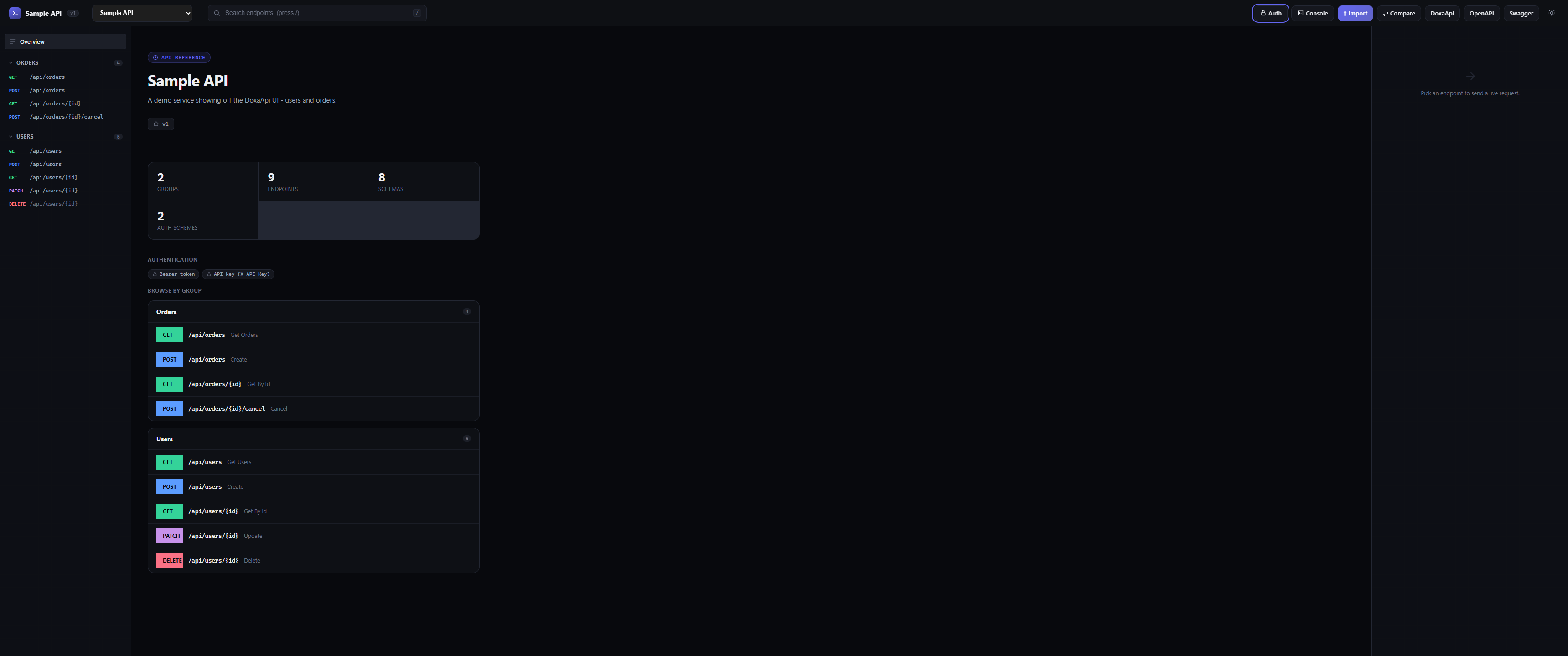
DoxaApi reflects over your controllers, generates an OpenAPI-compatible document, and serves a fast, single-page documentation UI.
## Quick start
```bash
dotnet add package EonaCat.DoxaApi
```
```csharp
using EonaCat.DoxaApi;
using EonaCat.DoxaApi.Middleware;
var builder = WebApplication.CreateBuilder(args);
builder.Services.AddControllers();
builder.Services.AddDoxaApi(options =>
{
options.Title = "Sample API";
options.Description = "A demo service showing off the DoxaApi UI.";
options.Version = "v1";
options.AccentColor = "#6366f1";
// Optional: declare how clients authenticate.
options.AddBearerAuth(description: "Sign in and paste your JWT here.");
});
var app = builder.Build();
app.UseRouting();
app.UseDoxaApi(options => options.RoutePrefix = "doxa");
app.MapControllers();
app.Run();
```
Run the app and open `/doxa`. That's the whole setup.
DoxaApi reads standard `///` XML doc comments and a handful of optional attributes:
```csharp
[ApiController]
[Route("api/users")]
[DoxaApiGroup("Users")]
public class UsersController : ControllerBase
{
/// Creates a new user.
/// The user to create.
/// The created user.
[HttpPost]
[DoxaApiExample("""{ "name": "Grace Hopper", "email": "grace@example.com" }""")]
public ActionResult Create([FromBody] CreateUserRequest request) { ... }
[HttpDelete("{id}")]
[Obsolete("Use POST /api/users/{id}/archive instead.")]
public IActionResult Delete(Guid id) { ... }
}
```
| Attribute | Purpose |
|||
| `[DoxaApiGroup("Name")]` | Groups endpoints in the nav (class or method level) |
| `[DoxaApiSummary("...")]` | Overrides the auto-generated summary |
| `[DoxaApiDescription("...")]` | Adds a longer description |
| `[DoxaApiExample("""{ ... }""")]` | Supplies a realistic request body example |
| `[DoxaApiHidden]` | Excludes a controller/action from the docs entirely |
| `[DoxaApiAuth("schemeId")]` | Marks an endpoint as requiring a specific security scheme |
| `[DoxaApiAllowAnonymous]` | Marks an endpoint as public, overriding any default scheme |
| `[Obsolete("...")]` | Flags the endpoint as deprecated in the UI |
Standard ASP.NET Core `[Authorize]` / `[AllowAnonymous]` attributes are also detected automatically.
## Authentication
Declare the security schemes your API actually uses, and DoxaApi takes care of the rest - detecting which endpoints need them, badging them in the docs, and prompting for credentials in the UI's **Authorize** dialog.
```csharp
builder.Services.AddDoxaApi(options =>
{
options.AddBearerAuth(); // Authorization: Bearer
options.AddApiKeyAuth("apiKey", "X-API-Key", "header"); // custom header
options.AddBasicAuth(); // HTTP Basic
options.AddOAuth2ClientCredentials("oauth2",
tokenUrl: "https://auth.example.com/connect/token",
scopes: new() { ["api.read"] = "Read access" });
options.DefaultSecurityScheme = "bearer"; // applied to any [Authorize] endpoint
// without an explicit [DoxaApiAuth]
});
```
Credentials entered in the UI are stored in the browser's `localStorage` (never sent anywhere except the documented API itself) and are automatically attached to every "Try it" request, cURL snippet, and generated code sample for endpoints that require them.
## Analytics Dashboard
The built-in **Analytics Dashboard** provides real-time insights into your API usage:
- **Endpoint Statistics** - View total requests, success rate, and average response times per endpoint
- **Request History** - Track recent requests with status codes and response times
- **Performance Metrics** - Monitor overall API health and uptime
- **Top Endpoints** - Identify your most-used endpoints at a glance
Click the **Dashboard** button in the top navigation to view live analytics. Metrics are automatically collected and refreshed every 5 seconds.
```csharp
// Access analytics programmatically
var metricsCollector = app.ApplicationServices.GetService();
if (metricsCollector != null)
{
var dashboard = metricsCollector.GetDashboard();
var recentRequests = metricsCollector.GetRecentRequests(limit: 50);
}
```
Get the analytics JSON via:
```
GET /doxa/analytics
```
All API requests and responses are automatically serialized, ensuring consistent behavior across your entire API documentation.
## Authoring your documentation
Every endpoint can return a schema-shaped fake response without touching your real controllers - flip the **"Send to mock server"** toggle in the Try-it panel, or call it directly:
```
GET /doxa/mock?operationId=Users_GetById
```
Useful for frontend teams who need to start building against an API before the backend is finished. Disable it with `options.EnableMockServer = false;` if you'd rather it not be exposed.
## API console
The **Console** (top bar) lets you fire an arbitrary HTTP request - any method, any absolute URL, custom headers and body - through the server rather than the browser. Because the request happens server-side, it isn't subject to the browser's CORS policy, which makes it useful for poking at a different host than the one serving the docs. Disable with `options.EnableConsole = false;`.
## Code generation
Every endpoint's Try-it panel includes a **Code** tab with ready-to-paste snippets in cURL, JavaScript (`fetch`), Python (`requests`), C# (`HttpClient`), and Go (`net/http`) - automatically including whatever auth headers you've configured.
## Comparing spec versions
Click **Compare** and upload a previous (or upcoming) OpenAPI/Swagger/DoxaApi JSON file to see exactly which endpoints were added, removed, or changed - including parameter, request-body, and security differences. Handy in code review for catching accidental breaking changes before they ship.
## Import & export
DoxaApi documents are available at:
- `/doxa/doxaApi.json` - native format
- `/doxa/openapi.json` - OpenAPI 3.0.3
- `/doxa/swagger.json` - Swagger 2.0
...and the **Import** button accepts any of the three formats back in, so you can merge in a hand-written spec, or load an API documented elsewhere.
## Configuration reference
```csharp
builder.Services.AddDoxaApi(options =>
{
options.Title = "My API";
options.Description = "...";
options.Version = "v1";
options.RoutePrefix = "doxa"; // served at /doxa
options.Servers.Add("https://api.example.com");
options.Theme = "auto"; // "auto" | "dark" | "light"
options.AccentColor = "#6366f1";
options.EnableMockServer = true;
options.EnableConsole = true;
});
```